Trajectories now in LangSmith: A readable view of every agent session
Key Takeaways
- Find the root cause faster. Trajectories show the ordered path an agent took across a session, so you can pinpoint where behavior deviated before diving into the trace for full details.
- Get expert feedback with less friction. SMEs can review agent behavior in a readable format, without parsing nested traces.
- Continuously improve with production behavior data. Score trajectories with online evaluators, save useful sessions to datasets, and export examples for supervised fine-tuning workflows.
Debugging agents often starts with a simple question: what did the agent actually do?
For short, single-turn workflows, the answer is usually easy to find. For longer-running agents, it gets harder fast. A single session can span many user turns, tool calls, retries, and subagent handoffs. The full trace is still the right place to inspect execution details, but it can be too much detail when you’re trying to understand the path the agent took.
Today, we’re launching Trajectories in LangSmith, a chronological, conversational view of an agent session. A Trajectory aggregates messages from humans, AI, and tools across the main agent and any subagents, then shows them in the order they first appeared.
You can now view threads as trajectories, score trajectories with online evaluators, and route them to annotation queues or datasets.
Try Trajectories in LangSmith
Trajectories make trace data easy to navigate.
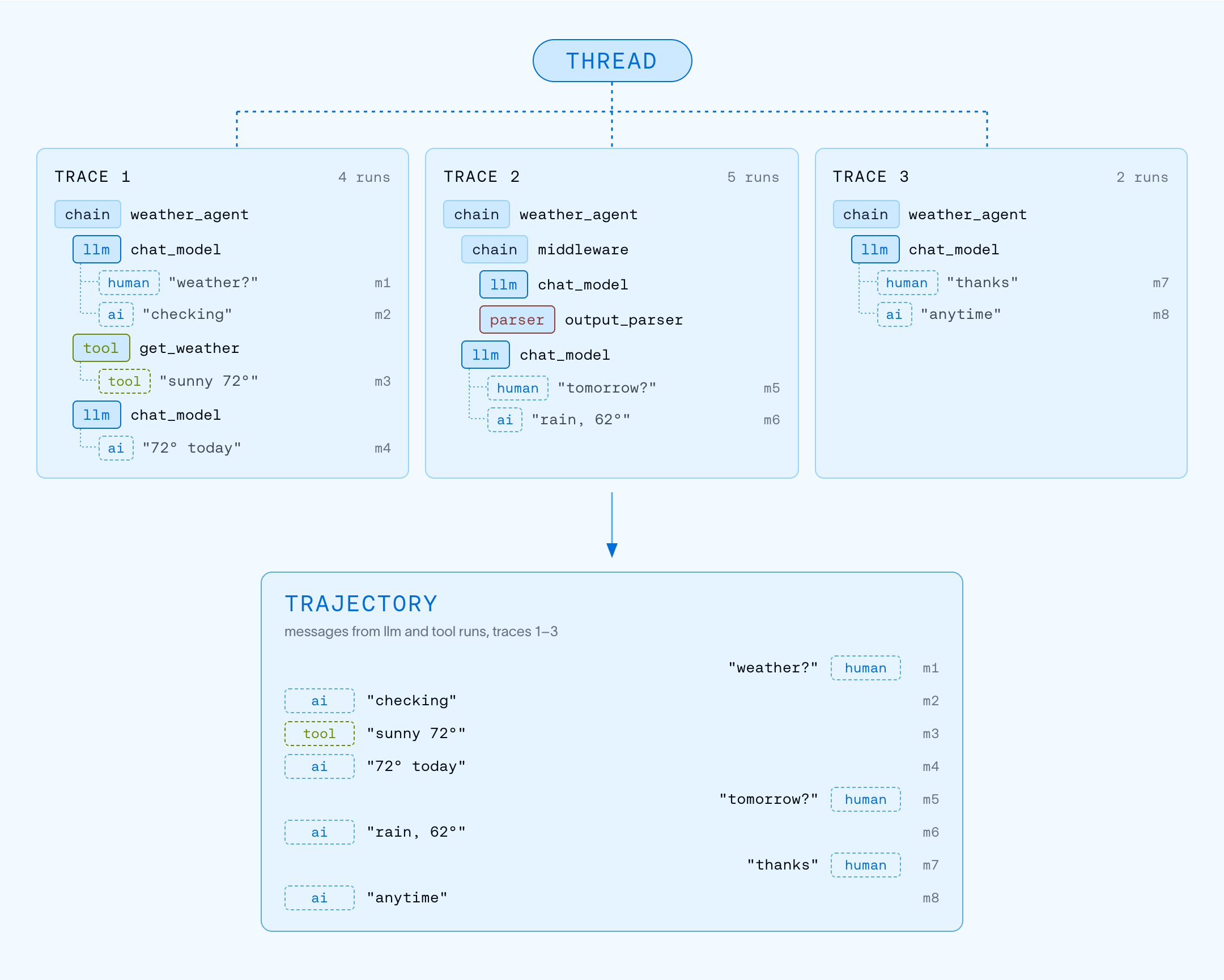
In LangSmith, every unit of work an agent performs is recorded as a run. Runs for a single operation form a trace. Traces from a multi-turn session are linked into a thread.
That structure gives engineers the full execution tree, including nested runs, timing, retries, inputs, outputs, and metadata. When you need to understand exactly how something executed, the trace is the source of truth.
But not every workflow needs the full execution tree, and that's where trajectories come in.
A trajectory is a projection over the traces in a thread. It removes the nested run structure and keeps the messages and actions that explain the agent’s behavior. Each message appears once, in order, so you can read the session as the path the agent took.
Trajectories work out of the box for traces sent from LangChain, LangGraph, and Deep Agents, from agent SDKs like OpenAI and Claude, and from coding agents like Codex, Claude Code, and Cursor.
Debug long-running agents faster
Most agent debugging starts with reconstructing the conversation or workflow. A user reports that an agent gave an outdated answer. You open the session and need to figure out where the agent deviated from its expected behavior. Did the agent misunderstand the user? Did it reuse stale context? Did it call the wrong tool? Did a subagent return a bad result? Did the final response ignore a tool output?
The answer is usually somewhere in the full trace, but it can be buried inside nested execution detail. That detail is exactly what you want once you know which run to look at, but finding that run in the first place is what takes the time.
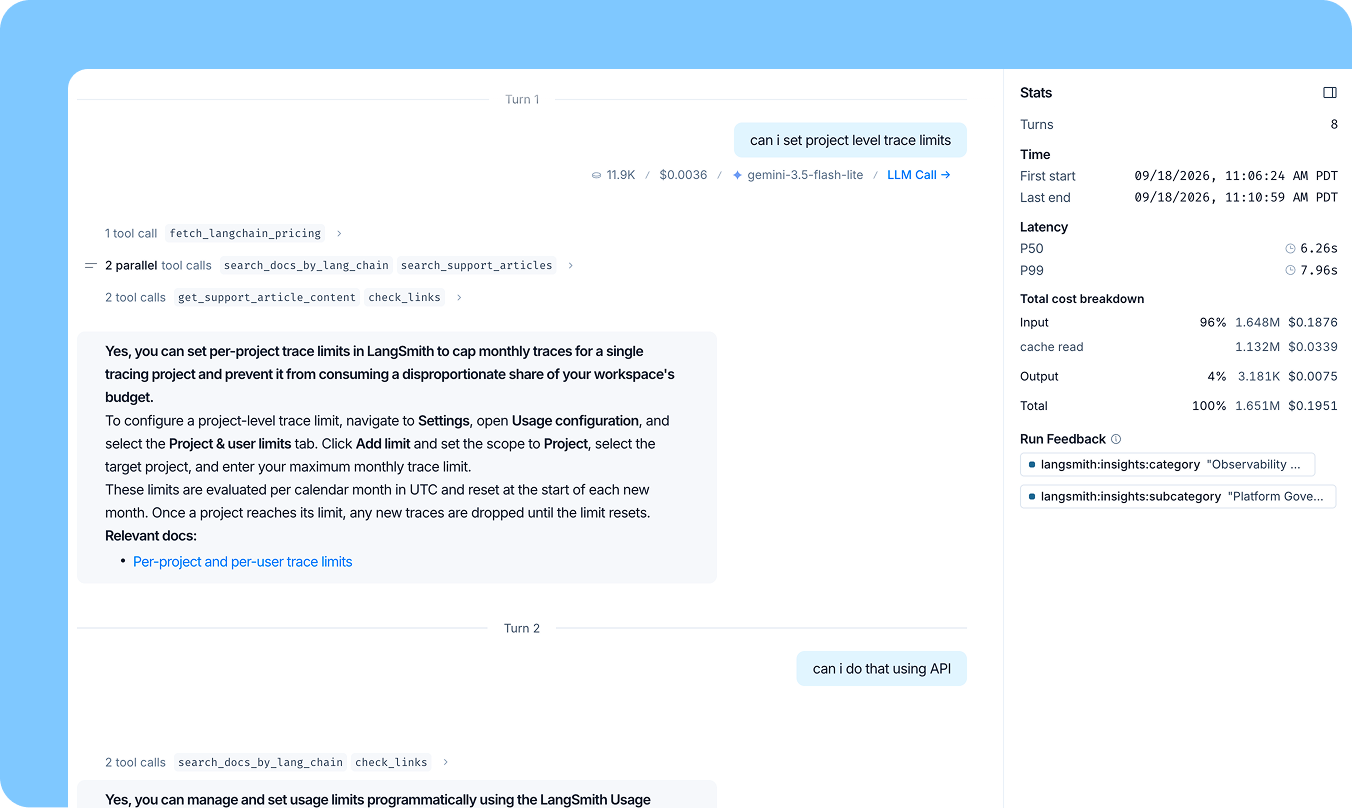
With Trajectories, you can start from the ordered path of the session. For example, a support agent runs nine turns and sixty messages and a customer complains the answer was wrong. Using the trajectory view, you can scan the conversation, tool calls, and agent actions in order, and find the turn where the agent reused an old tool result instead of fetching current data.
From there, they can jump into the underlying trace for the full runtime detail, including the exact tool input, output, timing, retries, and nested run structure. Instead of starting with every execution detail, first find the behavioral step that matters, then inspect the trace for that step.
Give subject-matter experts a readable view for review
The people responsible for reviewing an agent’s work and behavior may not be the people who built the agent.
A healthcare expert knows whether a clinical intake agent asked the right follow-up question. A financial services reviewer knows whether a compliance agent handled a case correctly. A support lead knows whether an escalation workflow matched policy. These reviewers need visibility into queries and an agent’s output, but don’t need to parse nested runs, retries or execution metadata.
Trajectories make those review workflows easier to scale. Route trajectories to annotation queues so subject-matter experts (SMEs) can score behavior, flag issues, and provide feedback using a readable view of the session. That feedback can then feed the rest of the agent improvement workflow; it helps teams refine prompts, update agent logic, improve evaluators, and build better datasets.
Score the agent path with online evals
Reading one trajectory tells you what happened in one session, but it doesn't tell you whether the same behavior is happening across production traffic. LangSmith online evaluators can now score trajectories, giving them better input for judging agent behavior across a session.
Without trajectories, scoring long sessions with run-level evaluators often includes repeated context as the conversation accumulates turn-over-turn. That can make evaluator inputs larger and noisier than they need to be. A trajectory keeps each message once, in order, so the evaluator can focus on the path the agent took.
Online evals can then surface the trajectories worth a closer look. Filter for low-scoring sessions, route them to human review, or save them into datasets for future testing.
Turn production behavior into post-training data
For teams working on post-training, trajectories make production sessions easier to turn into usable examples. They include the information needed to represent agent behavior, including system prompts, user messages, assistant responses, tool calls, and tool outputs.
That makes them useful for more than reviewing final answers. A good trajectory can show when the agent asked for clarification, which tools it called, how it used the results, and how it adapted across a session. Save high-quality trajectories to datasets and export them for supervised fine-tuning workflows, using production behavior as examples of what they want the model to reproduce.
As more teams use production data to improve agents, trajectories become an important primitive. They capture not just what the agent said, but the behavior that produced it.
Get started
Trajectories are available now on all plans in the US.
Try Trajectories today by logging in or signing up for LangSmith, and visit the docs for more detail.
看标题就点进来了,内容果然没让人失望。
讲解得很细致,新手也能看懂。