Kimi K3 开发者完全指南:2.8T 开源权重模型上手、1M 上下文、动态工具加载与成本解剖
一句话结论
在 Together AI API 上运行月之暗面 2.8T 开源权重模型所需的一切:基准、定价和可复制粘贴的代码。
你将学到:
- Kimi K3 是什么,有什么不同?
- 引擎盖下是什么:KDA、注意力残差和 Stable LatentMoE 架构
- 如何使用思考力度、流式、工具、视觉和 1M 上下文?
- 如何从第一次 API 调用走到生产?
- Kimi K3 在编程和智能体基准上与前沿对比如何?
- Kimi K3 在 Together AI 上多少钱?
Kimi K3 是月之暗面迄今最强的模型:2.8 万亿参数、全球首个 3 万亿参数级的开源模型,为长程编程、端到端知识工作和深度推理这类前沿智能任务设计。它也是第一个在 GPT 5.6 Sol 和 Claude Fable 5 层级竞争的开源权重模型,Together AI 与月之暗面团队直接合作提供服务。

迄今发布的最大开源权重模型
Kimi 团队深度投入规模化,这看得见:从 2025 年 7 月到 2026 年 7 月的十二个月里有九个月,Kimi 模型刷新开源模型规模上限。2.8 万亿参数的 K3 现在是已发布开源权重模型中最大的。
引擎盖下
两个架构更新构成 K3 的骨架,都为帮助信息在更长序列、更深网络中更容易流动而设计:
- Kimi Delta Attention(KDA):混合线性注意力机制,为超长上下文的注意力扩展提供高效基础。这是第一个支持 1M 上下文长度的 Kimi 模型。
- 注意力残差(AttnRes):跨模型深度选择性检索表示,而不是均匀累积。

在此之上,月之暗面用 Stable LatentMoE 框架把混合专家稀疏性推得更远:高效激活 896 个专家中的 16 个。在这个稀疏度(每 token 约激活 2% 专家)下,路由和优化成为一阶挑战,因此有几项支撑技术让 2.8T 规模稳定训练成为可能:
- Quantile Balancing:直接从路由器分数分位数推导专家分配,消除启发式更新和一个敏感的平衡超参数。
- Per-Head Muon:把 Muon 优化器扩展到按注意力头独立优化,更大规模下学习更自适应。
- Sigmoid Tanh Unit(SiTU):改进激活控制。
- Gated MLA:改进注意力选择性。

在 Together AI 上使用 Kimi K3
API 是 OpenAI 兼容的。以下代码片段面向 Together AI,使用官方 Together Python SDK。
python3 -m pip install --upgrade 'together>=2.0.0'
import os
from together import Together

MODEL = "moonshotai/Kimi-K3"

client = Together(
    api_key=os.environ["TOGETHER_API_KEY"],
)

completion = client.chat.completions.create(
    model=MODEL,
    messages=[{"role": "user", "content": "Introduce Kimi K3 in one sentence."}],
    max_tokens=130_000,
)
print(completion.choices[0].message.content)
思考力度
K3 可以通过顶层 reasoning_effort 字段配置,支持三档:low、high、max,默认 max。在 Together 上还可以通过标准 reasoning={“enabled”: False} 开关关闭思考。
# 调深度: "low" | "high" | "max"
completion = client.chat.completions.create(
    model=MODEL,
    reasoning_effort="max",
    messages=[{"role": "user", "content": "Prove that the square root of 2 is irrational."}],
    max_tokens=8192,
)

# 即时模式,思考 token 完全不计费
fast = client.chat.completions.create(
    model=MODEL,
    messages=[{"role": "user", "content": "What is the capital of France?"}],
    reasoning={"enabled": False},
    max_tokens=256,
)
流式
流式响应分别投递 reasoning_content(思考轨迹)和最终答案 content 的增量。
stream = client.chat.completions.create(
    model=MODEL,
    messages=[{"role": "user", "content": "Explain why the sky is blue."}],
    max_tokens=4096,
    stream=True,
)

in_answer = False
for chunk in stream:
    if not chunk.choices:
        continue
    delta = chunk.choices[0].delta
    thinking = getattr(delta, "reasoning_content", None) or getattr(delta, "reasoning", None)
    if thinking:
        print(thinking, end="", flush=True)
    if delta.content:
        if not in_answer:
            print("\n--- answer ---")
            in_answer = True
        print(delta.content, end="", flush=True)
视觉输入
可以提供多张图片输入。月之暗面还发布了视觉推理基准 Perception Bench。
import base64
from pathlib import Path

# 方式 A: 按 URL 传图
IMAGE_URL = "https://raw.githubusercontent.com/pytorch/pytorch/main/docs/source/_static/img/pytorch-logo-dark.png"
image_content = {"type": "image_url", "image_url": {"url": IMAGE_URL}}

# 方式 B: 本地图片转 base64(取消注释使用)
# image_data = base64.b64encode(Path("image.png").read_bytes()).decode()
# image_content = {"type": "image_url",
#                  "image_url": {"url": f"data:image/png;base64,{image_data}"}}

completion = client.chat.completions.create(
    model=MODEL,
    max_tokens=2048,
    messages=[{
        "role": "user",
        "content": [
            image_content,
            {"type": "text", "text": "Describe this image."},
        ],
    }],
)
视觉限制:图片数量无限制,但整个请求体必须低于 100 MB;建议图片最大 4K(4096x2160),更高分辨率只消耗处理时间和 token 不改善理解;token 成本随分辨率缩放。
结构化输出
用 response_format 配 json_schema 和 strict: true 约束最终 message.content。
import json

completion = client.chat.completions.create(
    model=MODEL,
    max_tokens=4096,
    messages=[{"role": "user", "content": "Ada Lovelace was 36 years old."}],
    response_format={
        "type": "json_schema",
        "json_schema": {
            "name": "person",
            "strict": True,
            "schema": {
                "type": "object",
                "properties": {"name": {"type": "string"}, "age": {"type": "integer"}},
                "required": ["name", "age"],
                "additionalProperties": False,
            },
        },
    },
)

person = json.loads(completion.choices[0].message.content)
# -> {'name': 'Ada Lovelace', 'age': 36}
更宽松的 {“type”: “json_object”} 模式在 Together 上也可用,只要语法有效 JSON 即可。无论哪种,max_tokens 要给足:整个思考轨迹在第一个受 schema 约束的 token 之前花掉,紧的上限会截断 JSON 而不是推理。
工具与 tool_choice
K3 保持标准工具选择约束。标准循环:在 tools 里声明函数;模型返回 tool_calls 时,把完整 assistant 消息追加进历史,再为每个调用追加一条带匹配 tool_call_id 的 tool 消息,然后再次调用。首轮用 tool_choice=“required” 强制至少一次工具调用,之后切回 “auto”。改变 tool_choice 不使前缀缓存失效。
import json

tools = [{
    "type": "function",
    "function": {
        "name": "get_weather",
        "description": "Get the current weather for a city.",
        "parameters": {
            "type": "object",
            "properties": {
                "city": {"type": "string", "description": "City name, e.g. Paris"},
                "unit": {"type": "string", "enum": ["celsius", "fahrenheit"]},
            },
            "required": ["city"],
            "additionalProperties": False,
        },
    },
}]

def get_weather(city, unit="celsius"):
    return {"city": city, "temperature": 21, "unit": unit, "conditions": "sunny"}

messages = [{"role": "user", "content": "What's the weather in Paris?"}]
choice_mode = "required"          # 首轮强制工具调用

for _ in range(5):
    response = client.chat.completions.create(
        model=MODEL,
        messages=messages,
        tools=tools,
        tool_choice=choice_mode,
        max_tokens=8192,
    )
    choice = response.choices[0]
    message = choice.message

    # 追加完整 assistant 消息,含思考轨迹
    messages.append(message.model_dump(exclude_none=True))

    if choice.finish_reason != "tool_calls" or not message.tool_calls:
        print(message.content)
        break

    for call in message.tool_calls:
        try:
            args = json.loads(call.function.arguments)
        except json.JSONDecodeError:
            args = {}
        messages.append({
            "role": "tool",
            "tool_call_id": call.id,
            "content": json.dumps(get_weather(**args)),
        })

    choice_mode = "auto"          # 强制轮之后交还控制权
动态工具加载
可以把完整工具定义(名称、描述、参数)放进一条带 tools 字段、无 content 的 system 消息,工具从该消息位置起可用。
关键规则:动态声明用与顶层 tools 完全相同的格式;按请求生效、服务器不保留,所以要自己在后续请求历史里保留该消息——保留同时保住工具可用性和缓存前缀,丢掉意味着模型无法再调用该工具且变化的前缀可能 miss 缓存;在末尾追加动态声明不影响缓存前缀,删除或修改更早的声明可能伤害变更点之后的缓存命中。

大型工具目录的推荐模式:
- 会话开始:只声明一个 search_tools 函数(由你的后端实现)加几个核心工具,在系统提示里宣传可搜索的领域标签。
- 首轮:设 tool_choice: “required” 强制先检索后回答。
- 按需注入:根据检索结果把匹配工具的完整定义通过 system 消息插入。
- 直接调用:模型在后续生成中使用已加载的工具。
- 成本权衡:在会话开始前决定 reasoning_effort。
CATALOG = {
    "convert_currency": {
        "type": "function",
        "function": {
            "name": "convert_currency",
            "description": "Convert an amount from one currency to another.",
            "parameters": {
                "type": "object",
                "properties": {
                    "amount": {"type": "number"},
                    "from_currency": {"type": "string"},
                    "to_currency": {"type": "string"},
                },
                "required": ["amount", "from_currency", "to_currency"],
                "additionalProperties": False,
            },
        },
    },
}

search_tools = {
    "type": "function",
    "function": {
        "name": "search_tools",
        "description": "Search the tool catalog. Tags: finance, travel, files.",
        "parameters": {
            "type": "object",
            "properties": {"query": {"type": "string"}},
            "required": ["query"],
            "additionalProperties": False,
        },
    },
}

messages = [{"role": "user", "content": "Convert 100 USD to EUR."}]

# 1. 强制先检索
first = client.chat.completions.create(
    model=MODEL, messages=messages, tools=[search_tools],
    tool_choice="required", max_tokens=8192,
)
call = first.choices[0].message.tool_calls[0]
messages.append(first.choices[0].message.model_dump(exclude_none=True))
messages.append({"role": "tool", "tool_call_id": call.id,
                 "content": json.dumps(list(CATALOG))})

# 2. 把匹配定义注入末尾。tools 字段,无 content
messages.append({"role": "system", "tools": [CATALOG["convert_currency"]]})

# 3. 模型直接调用新加载的工具
second = client.chat.completions.create(
    model=MODEL, messages=messages, tools=[search_tools],
    tool_choice="auto", max_tokens=8192,
)
print(second.choices[0].message.tool_calls)
# -> convert_currency({"amount":100,"from_currency":"USD","to_currency":"EUR"})
1M 上下文与自动缓存
Together 支持完整 1M 上下文长度,上下文缓存自动。让长前缀(系统提示、知识库、仓库转储)跨请求字节稳定,后续调用才能命中缓存。月之暗面建议把固定批量上下文(知识文档)放在 messages 数组最前面、system 消息之前,问题和回复放在其后。
def _get(obj, key, default=None):
    if obj is None:
        return default
    return obj.get(key, default) if isinstance(obj, dict) else getattr(obj, key, default)

usage = completion.usage
reasoning_tokens = _get(_get(usage, "completion_tokens_details"), "reasoning_tokens", 0)
cached_tokens = _get(_get(usage, "prompt_tokens_details"), "cached_tokens",
                     _get(usage, "cached_tokens", 0))

print(f"prompt={usage.prompt_tokens} cached={cached_tokens} "
      f"completion={usage.completion_tokens} thinking={reasoning_tokens}")
# -> prompt=86 cached=64 completion=133 thinking=111
采样参数
采样参数是固定的,应从请求中省略。模型用这些参数训练,不支持设其它值:temperature = 1.0、top_p = 0.95、n = 1、presence_penalty = 0、frequency_penalty = 0。
保留思考
K3 以保留思考历史模式训练,思考轨迹是下一轮依赖的状态。用以下方式保留上一轮思考 token 并转发给后续轮次。

SECRET = "48213"
TRACE  = "For the session codeword I will use 48213. Committing to 48213 as the codeword."

messages = [
    {"role": "user", "content": "Pick a 5-digit codeword for our session and remember it. "
                                "Reply with exactly: OK"},
    # 轨迹搭在 assistant 轮上,无需标志位
    {"role": "assistant", "content": "OK", "reasoning_content": TRACE},
    {"role": "user", "content": "What codeword did you pick? Reply with just the number."},
]

completion = client.chat.completions.create(
    model=MODEL,
    messages=messages,
    max_tokens=4000,
    chat_template_kwargs={"preserve_thinking": True}
)
print(completion.choices[0].message.content)   # -> 48213
删掉 reasoning_content 那行,同一调用每次都会回答一个新编的数字。真实代码里你从不手写轨迹;你回放模型产出的,就是工具循环里的那一行:
# 轮 1 - 让 K3 思考
first = client.chat.completions.create(
    model=MODEL,
    messages=[{"role": "user", "content": "Pick a random 5-digit number and commit to it. "
                                          "Do not tell me. Reply with exactly: OK"}],
    max_tokens=4000,
)

# 整体回放 assistant 轮。model_dump 保留 reasoning_content 与 content
history = [
    {"role": "user", "content": "Pick a random 5-digit number and commit to it. "
                                "Do not tell me. Reply with exactly: OK"},
    first.choices[0].message.model_dump(exclude_none=True),
    {"role": "user", "content": "What number did you pick? Reply with just the number."},
]

second = client.chat.completions.create(model=MODEL, messages=history, max_tokens=4000)
print(second.choices[0].message.content)
Kimi K3 定价
按 token 计价,缓存命中的输入档奖励稳定前缀:
| 档位 | 每 1M token 价格 |
|---|---|
| 输入(缓存命中) | $0.30 |
| 输入(缓存未命中) | $3.00 |
| 输出 | $15.00 |
上下文窗口 1,048,576 token(1M)。思考 token 按输出计费。
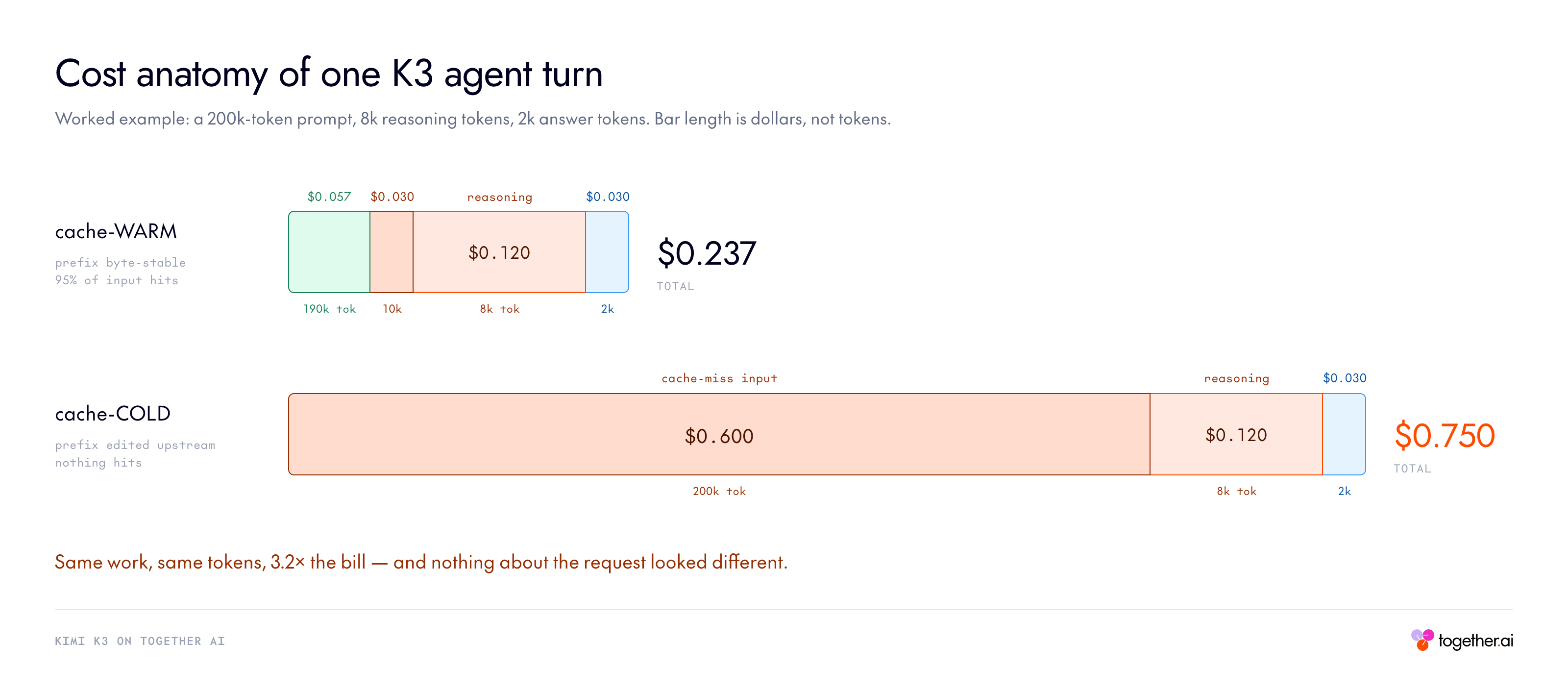
两个必须消化的成本要点:
- 缓存是你的杠杆。 编程负载下命中率超 90% 时,有效输入成本趋向 $0.30 的下限——但前提是前缀保持稳定。重构更早的消息或工具声明会打破它。
- 推理按输出计费且可调节。 思考 token 是 $15/M 的输出 token,思考无法完全关闭,但 reasoning_effort 有三档。max 仍是默认,所以从不设置该字段的管线在每次调用上付最大推理账单——包括最琐碎的那些。
Kimi K3 基准
整个评测套件中,Kimi K3 打出前沿级数字。它在多个编程和智能体基准上领先(SWE Marathon、BrowseComp、DeepSearchQA、AutomationBench、OmniDocBench),在其它上与最强专有模型保持竞争力,同时明显胜过另一个受测开源模型 GLM-5.2。少数基准落后于 Claude Fable 5 和 GPT 5.6 Sol,与月之暗面对模型的定位一致。所有 Kimi K3 结果均使用 max 思考力度。
| 基准 | Kimi K3 max | Claude Fable 5 | GPT 5.6 Sol | Claude Opus 4.8 | GLM-5.2 max |
|---|---|---|---|---|---|
| 编程 | |||||
| DeepSWE | 67.5 | 70.0 | 73.0 | 59.0 | 46.2 |
| Program Bench | 77.8 | 76.8 | 77.6 | 71.9 | 63.7 |
| Terminal Bench 2.1 | 88.3 | 84.6 | 88.8 | 84.6 | 82.7 |
| FrontierSWE | 81.2 | 86.6 | 71.3 | 66.7 | 67.3 |
| SWE Marathon | 42.0 | 35.0 | 39.0 | 40.0 | 13.0 |
| PostTrain Bench | 36.6 | 41.4 | 34.6 | 34.1 | 34.3 |
| MLS Bench | 48.3 | 49.9 | 46.2 | 42.8 | 40.4 |
| 智能体 | |||||
| GDPval-AA v2 (Elo) | 1668 | 1760 | 1748 | 1600 | 1514 |
| BrowseComp | 91.2 | 88.0 | 90.4 | 84.3 | N/A |
| DeepSearchQA (F1) | 95.0 | 94.2 | N/A | 93.1 | N/A |
| Toolathlon-Verified | 73.2 | 77.9 | 74.9 | 76.2 | 59.9 |
| MCP Atlas | 84.2 | 84.7 | 83.6 | 83.6 | 82.6 |
| Automation Bench | 30.8 | 29.1 | 29.7 | 27.2 | 12.9 |
| Job Bench | 52.9 | 57.4 | 46.5 | 48.4 | 43.4 |
| 推理与知识 | |||||
| GPQA-Diamond | 93.5 | 92.6 | 94.1 | 91.0 | 91.2 |
| 视觉 | |||||
| MMMU-Pro | 81.6 | 81.2 | 83.0 | 78.9 | N/A |
| CharXiv (RQ) | 84.8 | 88.9 | 84.6 | 80.5 | N/A |
| MathVision | 94.3 | 94.8 | 95.8 | 86.7 | N/A |
| OmniDocBench | 91.1 | 89.8 | 85.8 | 87.9 | N/A |
| PerceptionBench | 58.5 | 57.2 | 59.7 | 47.2 | N/A |
带星号(*)的值是在与基础跑不同条件下报告的(如引自外部来源或不同测试框架),N/A 表示无公开分数,完整表见来源报告。
常见问题
Kimi K3 是什么? 月之暗面 2.8 万亿参数旗舰模型,3 万亿参数级首个开源模型,为长程编程、知识工作和推理构建。
是开源的吗? 是,以开源权重发布,Together AI 与月之暗面团队直接合作提供服务。
上下文窗口多大? 1M token(1,048,576),Together AI 完整支持并自动上下文缓存。
Together AI 上多少钱? 缓存命中输入 $0.30/1M、未命中输入 $3.00/1M、输出 $15.00/1M。
能关掉思考吗? Together 上可用 reasoning={“enabled”: False} 禁用,或用 reasoning_effort 的 low/high/max 调节深度。
支持视觉吗? 支持,原生视觉、每请求多图,只要请求体合计低于 100 MB。
上手清单
- 运行 Kimi K3 推理:Together AI 模型页 moonshotai/Kimi-K3
- 开始构建:docs.together.ai 快速开始文档
从一次 API 调用开始,把 K3 变成你的生产工具。
原文信息
- 作者:Together AI
- 发布时间:2026-08-01 原文地址:
不错不错,已加入书签。
看标题就点进来了,内容果然没让人失望。
整理得太全面了,省了我不少时间。
楼主辛苦了,内容很有参考价值。
讲解得很细致,新手也能看懂。
很有价值的分享,感谢整理。